I recently upgraded my digital camera from a Canon EOS Rebel T4i to a refurbished Canon EOS R6. Despite the camera looking brand new (i.e., no visible signs of wear and tear on the exterior), naturally I wanted to see if I could retrieve its shutter count. The shutter count (a.k.a. shutter actuation number) is the number of times a camera’s mechanical shutter has been fired and is an indicator of wear and tear, similar to the mileage on a used car. But unlike a used car where you can simply look at the odometer to see the mileage, getting the shutter count from a camera can be tricky.
From what I’ve read in multiple discussion forums, and based on my own experience, there does not exist a universally compatible method of obtaining shutter count for all camera makes and models. If you’re trying to obtain a shutter count on your digital camera, you might need to tinker with different approaches until you find one that works.
Approach 1: Get Shutter Count From Camera Body
The first approach is to try a dedicated software application that can fetch the shutter count from your camera body. This is typically done by connecting the camera body to your computer via a USB cable. Software applications may differ on Windows and Mac operating systems, but I found that Mac freeware application FreeShutterCounter v1.2.2 was able to retrieve the shutter count on my T4i which was listed as a supported camera.

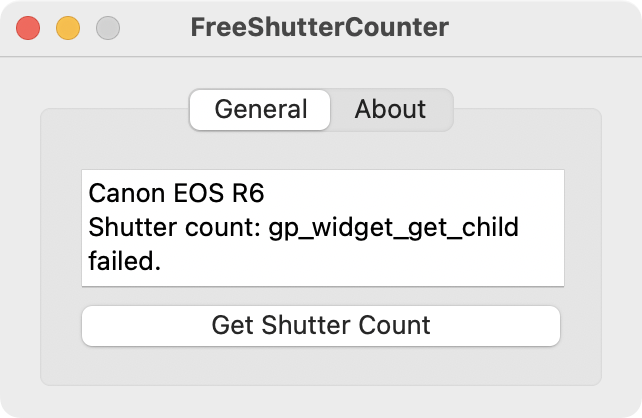
Unfortunately it was unable to retrieve the shutter count on my R6. That was not surprising because the R6 was not listed as a supported camera.
There is also a ShutterCount app which is available for purchase (currently $8.99) on the Mac App Store. Instead of providing an exact shutter count for the R6, it provides a shutter count of “≤ 1000” and addresses this in its FAQ as follows:
“New Canon cameras (all mirrorless models as well as DSLRs released in the recent years) provide the shutter counter value in 1000 increments. This is how 1D-series models always displayed the counter in the menu. Obviously Canon is on the opinion that this is pretty much enough for practical purposes. So ShutterCount follows what Canon dictates, and displays the counter identical to how 1D-series models and the R3 does it: in "less than or equal to" notation, and in 1000 increments.”
Approach 2: Get Shutter Count From Image EXIF Metadata
The second approach is to try to retrieve the exchangeable image file format (EXIF) metadata from an image file. EXIF data typically store things like the image date/time, camera body, camera lens, image filename, shutter speed, aperture, and other camera settings that were used to take the image. It may or may not include the shutter count. If it does contain the shutter count, the metadata field may be called “shutter count” or “image number” or other variations depending on the make and model of your camera.
I used ExifTool which a free command line executable and a collection of libraries. It does not come with a graphical user interface, so if you’re not accustomed to entering commands in a terminal application, you may struggle to use it. In any case, I retrieved EXIF metadata from images in both of my cameras, and it appears that shutter count is not stored in images in my older T4i, but it does exist in the images for my newer R6.
(blah blah blah)
Specular White Level : 14888
Linearity Upper Margin : 12735
Shutter Count : 16
Vignetting Corr Version : 96
Rating : 0
(yada yada yada)
This was the data read from IMG_0009.CR3, the 9th photo I had ever taken from my refurbished R6, so I assume that the shutter count was 7 upon arrival.
Coincidentally I later found a Mac app called ExifTool Reader which is available for free on the Mac App Store. It appears that this is simply a macOS application that uses the ExifTool libraries. I tried unsuccessfully to obtain the shutter count on my R6, and while troubleshooting, I discovered that ExifTool Reader (the app) is currently using version 12.59 of the ExifTool libraries (updated 4/2/2023), whereas ExifTool (the command line executable and libraries) is currently on version 12.70 (updated 11/19/2023). I assume that somewhere between version 12.59 and 12.70, the libraries began to recognize the shutter count in my R6 EXIF metadata.
A variation of this approach is to upload an image file to a shutter count website. There are many such websites, and you should pay attention to any fine print regarding what they may do with the images that you upload. Consider taking a dummy photo and submitting that. I tried a few of these websites, and all of them informed me that my uploaded image from my R6 does not store shutter count information, despite me having successfully retrieved the shutter count using ExifTool. One of the websites cleverly offered a “helpful” link to a software application that claimed to be able to retrieve my camera’s shutter count. I am purposefully not adding links to any of these websites because I am unable to verify authenticity and was not able to get any of them to work.
I wonder if certain websites are unable to retrieve shutter count from the EXIF data due to evolving specifications. EXIF 1.0 was published in October 1995, EXIF 2.0 was published in November 1997, and EXIF 3.0 was published in May 2023. It is possible that firmware updates may result in differences in how EXIF data are written into image files, thus making it difficult for websites and app developers to stay current.
In summary, if you are not aware of a verified method of obtaining the shutter count from your camera, you may need to experiment until you find one that works. And if you own a Canon EOS R6, hopefully an EXIF reader will get you straight to the answer.