I previously wrote about SafePass LA and briefly discussed why I prefer to store my COVID-19 vaccination record in Apple Wallet. In this post, I’d like to show you how you can get your COVID-19 vaccination record into Apple Wallet. There are 2 methods that I know of.
Method 1: Healthvana
The Los Angeles County Department of Public Health partnered with Healthvana in December of 2020 to provide digital vaccination records as discussed here. A couple weeks after I received my 2nd Moderna COVID-19 vaccine, I received a text message from Healthvana. It contained a URL that allowed me to view a digital record of my vaccination:

After entering some information to confirm my identity, I was shown my COVID-19 vaccine record and presented with an option to add it to my Apple Wallet.
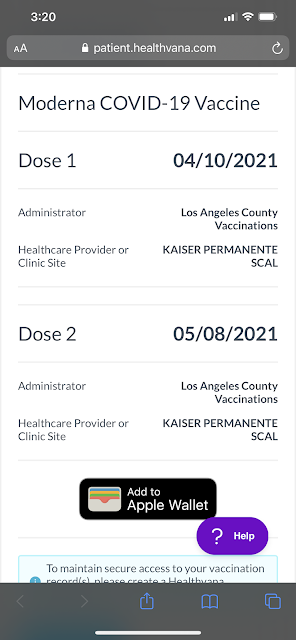
If you did not receive a text message or email from Healthvana, and if you received your COVID-19 vaccination in the county of Los Angeles, you can contact Healthvana and request your COVID-19 digital vaccination record. In the “What is your question about?” field, select “COVID-19 Vaccination” and complete the rest of the form. When I did this for my wife, she received a response later that same day.
Method 2: Vaccination QR Code
If you prefer not to use Healthvana, or if you did not receive your COVID-19 vaccination in the county of Los Angeles, there are other ways to get your COVID-19 vaccination record into Apple Wallet. All you need is a QR code of your vaccination record and an iPhone running iOS 15 or later (at the time of this writing, the current version is iOS 15.1.1).
Step 1 is to get a QR code of your vaccination record. There are at least 2 ways to get a QR code. The first is to retrieve it from your provider. For example, Kaiser Permanente has a portal where patients can login and retrieve immunization history and other parts of one’s medical record. This includes a QR code in SMART Health Card format.
If your provider does not provide a QR code to you, and if you live in the state of California, you can request your digital COVID-19 vaccine record at https://myvaccinerecord.cdph.ca.gov. Simply enter your name, date of birth, your phone number or email, and a 4-digit PIN (any 4 numbers that you want, for the purpose of securely accessing your digital record). After submitting this information, you should soon receive a text message or email with a link to retrieve your COVID-19 vaccine record which will contain a QR code.
Step 2 is to scan your QR code with your iPhone running iOS 15 or later. Simply launch your camera app and point your rear-facing camera at the QR code. Once your phone recognizes the QR code, it will display a “Health” notification:

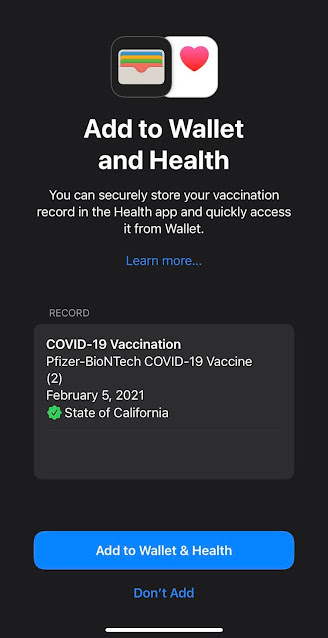
Tapping the “Health” notification will take you to the Apple Health app with a prompt to add your COVID-19 vaccination record to Wallet and Health. Here’s what it looked like when I did this for my wife:
Step-by-step instructions, along with other options to add verifiable COVID-19 vaccination information to Apple Wallet and Health, are provided here. Learn more about Apple Wallet here.


