Showing posts with label Cellular. Show all posts

Thursday, March 2, 2023

Visible Wireless Network “Upgrade”

I was recently notified by my wireless provider, Visible, that a network upgrade was “required to improve your service” and that the upgrade would result in a “faster, more reliable network” for the same price.

All three of our family members use Visible, we all requested the upgrade, and we were all sent new SIM cards. My wife and I installed our new SIM cards and simultaneously attempted to activate our phones on the new Visible network. Unfortunately neither of our phones successfully activated, so we were stuck without cellular service for almost a full day.

After several hours of futile activation attempts, I contacted Visible using their chat service which is the only way they provide customer support. On my first attempt, I was queued for about an hour and watched the progress bar slowly make its way to 100%, at which time I was supposed to be connected to a chat agent. Unfortunately something went wrong, and instead of connecting me to an agent, the chat box froze so I had to abort. On my second attempt, I waited another hour and this time was successfully connected to a chat agent. The chat conversation was horribly slow. Each time I entered a response, the agent would take 30-60 seconds to reply and often provided generic answers such as “Thank you” or “I’ll look into that” or other seemingly canned responses. It also felt to me like the agent was trying to help multiple customers at the same time due to the slowness of the replies. Anyway, after spending an hour on the chat line, I was finally told that there was some kind of outage on the Visible side (not Verizon which is the actual network that Visible customers use), that they were trying to fix it, and to try activating again the next day. I was also credited $5 toward my next monthly payment for all my troubles (admittedly this probably added 10 minutes to my total chat time). My wife and I did both successfully activate our phones the next morning.

Then it occurred to me that I should put Visible’s claim of a faster network to the test. Since I had not yet activated my daughter’s phone on the new network, I decided to do some speed comparisons using the iOS Speedtest app. I’ll admit that I could not conduct a completely fair head-to-head comparison because I was pitting my iPhone 12 Pro Max (which I’ll refer to as “12”) on the new Visible network against my daughter’s iPhone X (“X”) on the old Visible network.

My first thought was to perform a series of “control” speed tests where I measured download (“D”) and upload (“U”) speeds with both phones connected to our home Wi-Fi (provided by Spectrum). For all tests, both phones were placed next to one another so they were equidistant from the router, and I initiated the speed tests on both phones at the same time. The results showed similar speeds on both phones, with slightly faster speeds on 12 vs. X which might be attributable to the faster processor on 12 (I am guessing here).

Control: Both Phones Using Home Wi-Fi
Run12 D (Mbps)X D (Mbps)12 U (Mbps)X U (Mbps)
133.8135.004.173.34
242.8234.063.193.09
342.2934.363.203.25
Average39.6434.473.523.23

The next thing I did was to test 12 (using new Visible LTE) against X (using old Visible LTE). Since my 12 is capable of 5G, but X can only use LTE, I had to change the cellular setting on 12 to use LTE only. I was pleased to see that I saw faster speeds on 12 than X, and the difference was greater than the observed difference in Wi-Fi speeds, so in other words the faster speed on 12 may not be explained by the hardware difference alone.

Comparison: 12 (New Visible LTE) vs. X (Old Visible LTE)
Run12 D (Mbps)X D (Mbps)12 U (Mbps)X U (Mbps)
418.3611.137.335.04
538.4326.3010.137.42
627.4412.807.526.45
Average28.0816.748.336.30

Next, I installed the new SIM card on X and successfully activated the phone right away. Then I re-ran speed tests on 12 and X, with both phones using the new Visible LTE network. Surprisingly, I observed more or less the same speeds on both phones. Because I saw wide variability in download speeds on both phones with different runs, I performed 5 runs on each phone (instead of 3 like I did before). In any case, with this small sample size, I saw no convincing evidence that the network upgrade yielded faster speeds on X—about 17 Mbps download and 6 Mbps upload on both the old and new Visible networks.

Comparison: Both Phones Using New Visible LTE
Run12 D (Mbps)X D (Mbps)12 U (Mbps)X U (Mbps)
716.6514.488.547.22
829.8022.956.705.35
944.5313.737.035.62
1010.9125.036.255.30
1112.1228.447.834.10
Average30.3317.057.426.06

For good measure, I re-ran my control comparisons with both phones using home Wi-Fi, and results were very similar to my initial control run.

Control: Both Phones Using Home Wi-Fi
Run12 D (Mbps)X D (Mbps)12 U (Mbps)X U (Mbps)
1235.5038.750.891.21
1345.4231.295.402.29
Average40.4635.023.151.75

In conclusion, I was disappointed to not see any significant speed improvement on the new Visible network. Even though the 12 vs. X comparison was not a fair head to head comparison, the speeds on X were similar on the old and new Visible LTE network. A limitation of this experiment is that I only compared LTE speeds because X is not capable of 5G. It is possible that the new Visible network is in fact faster than the old network in 5G connectivity, but I did not see that in fine print anywhere, nor was I able to directly test that hypothesis.

This reminds me of a similar experiment that I conducted a couple years ago when I conducted a Comparison of 4G and 5G Cellular Networks.

Thursday, December 17, 2020

Technology or Clairvoyance?

I received the following email message today from my bank:

It says, “Looks like the mobile phone number we have on file for you may be incorrect. This could be the result of changing your phone number and/or mobile carrier.” As I’ve recently discussed, I changed my mobile phone carrier (and kept the same phone number). I wonder how my bank knew that I changed my phone number and/or mobile carrier? My new mobile carrier would not have notified my bank, as they have no knowledge of my banking information—I only provided a credit card as a form of payment. If you know of the technology that was used to detect the change in my mobile carrier, please leave a comment. Inquiring minds want to know!

🤔

Tuesday, December 15, 2020

Comparison of 4G and 5G Cellular Networks

I was pleasantly surprised to receive the following email from Visible Wireless today, announcing the arrival of its 5G mobile network:

Visible Wireless runs on the Verizon Wireless network. Eager to see if the 5G network offered any noticeable advantages, I upgraded my iPhone 12 Pro Max to iOS 14.3 and updated my carrier settings as instructed. When turning off Wi-Fi, I could see “5G” in the upper right corner of my iPhone home screen where it would have otherwise displayed “LTE” (4G), so I was all set.

I felt that the best way to compare 4G and 5G speeds was to perform a head to head comparison of the two networks. Since my wife had not yet updated the operating system and carrier settings on her iPhone 12 Pro, she was still using the Visible 4G LTE network. Although we have slightly different phone models, I didn’t think it would account for any significant differences in speed, so effectively the only major difference was the 4G vs. 5G network.

I installed Speedtest for iOS on both phones, disabled Wi-Fi, and ensured that both phones were connected to their respective 4G and 5G networks. I then ran the speed tests 5 times on each phone, with each pass performed simultaneously on both phones. Here are the results of each speed test on the iPhone 12 Pro using 4G LTE:


Here are the results of each speed test on the iPhone 12 Pro Max using 5G:


Here is a summary of all results:

Surprisingly, download speeds were slightly higher on the 4G network (55.3 Mbps) than the 5G network (50.7 Mbps). However, upload speeds were more than twice as fast on 5G (9.59 Mbps) as compared with 4G (4.20 Mbps). Ping times showed slightly less latency on 5G (54 ms) than 4G (64 ms). Definitions of ping, jitter, and packet loss are provided on the Speedtest glossary.

In summary, 5G is supposed to offer faster speeds and lower latency than its 4G predecessor. While I found slightly lower latency and faster upload speeds with 5G, I was surprised to see slower download speeds with 5G than 4G. I’m not impressed so far, but I also recognize that 5G mobile networks are newcomers, and maybe they still need to be expanded and optimized. Another possibility could be that network deprioritization could have effectively throttled both 4G and 5G connections to approximately the same speed, thereby limiting the potential of 5G on Visible Wireless. Admittedly this was a small sampling, and results could have been influenced by various factors related to the status of the 4G and 5G cellular networks at the time of testing. A more thorough investigation could involve me repeating the above procedure at different times of day. Hopefully 5G will give me better performance in the future, as I cannot undo the update to my carrier settings.

Update 12/22/2020: This article reached similar conclusions as I did about 5G being slower than 4G LTE. It offers explanations as to why this is currently the case and provides instructions for how to turn off 5G and use 4G LTE in the meantime.

Monday, September 9, 2019

Verizon Wireless Safety Mode

Our family doesn’t usually consume a large amount of wireless data. While we often use our desktop and mobile devices to stream music and video content through our wifi connection at home, we generally use our cellular data sparingly while on the road. Therefore, we subscribe to a 2 GB data plan through Verizon Wireless.

About a year ago, I activated a complimentary Safety Mode option that allows users to continue using cellular data at reduced speeds if they run out of data before the end of their billing cycle. This past month, we vacationed in Maui and also took a road trip to Arizona, New Mexico, and Texas to visit some national park service sites. We used up our 2 GB allowance of data several days before the end of our billing cycle, so Safety Mode kicked in.

According to Verizon Wireless, data speeds in Safety Mode are reduced to 128 Kbps. I wanted to verify for myself, so I installed Speedtest for iOS and checked for myself. Here’s my result:


A download speed of 0.05 Mbps x 1024 = 51.2 Kbps, about half of the advertised speed. For comparison, I checked the speed of my Spectrum wifi connection:


As a final comparison, at the start of my new billing cycle, I checked the normal speed of my Verizon Wireless connection:


From this I can conclude that (1) at least relatively speaking, the results of Speedtest seem to be on target; and (2) my Safety Mode data speed appears to be slower than advertised. Despite this finding, I think it is fantastic that I have a way to get cellular data beyond my monthly allowance without being charged overages or being required to upgrade my plan.

Thursday, October 4, 2018

Presidential and Non-presidential Text Alerts

Yesterday I was in the San Antonio International Airport when suddenly I heard the sound of a loud alert resonate throughout the airport. I didn't realize it at the time, but my phone was producing the sound in concert with hundreds of other phones. This was the reason why:


According to an announcement from the Federal Emergency Management Agency, a nationwide test of the Wireless Emergency Alerts (WEA) and Emergency Alert System was scheduled for yesterday afternoon. The announcement says, "The WEA system is used to warn the public about dangerous weather, missing children, and other critical situations through alerts on cell phones."

I wonder why this was called a "Presidential Alert" and am guessing that it has to do with our president compensating for his feelings of inadequacy related to relief efforts in Puerto Rico following Hurricane Maria. It would have been more appropriate to call it a "National Alert" or something similar.

Anyway, did you know that in addition to these national alerting systems, there are local emergency alerting programs too? If you live in Los Angeles, here are a couple that might be of interest:

Alert LA County: https://www.lacounty.gov/emergency/alert-la/
NotifyLA: http://emergency.lacity.org/notifyla

There are local alerting programs in other metropolitan areas too. Try searching Google for "text alert [city]" to learn more. Stay safe and be alert! After all, the world needs more lerts (rimshot).

Monday, April 6, 2015

Carnival Cruise Revelations and Factoids

Given that the theme of this blog is about my digital lifestyle, today's post could be considered antithetical to the purpose of the blog.  Nevertheless, I'd like to share some revelations and factoids from a 1-week Mexican Riviera cruise that I took last week.

  • Caffeine Cleansing. While on board, the food, water, and juice was part of the all-inclusive fee, but there were extra charges for sodas so I remained soda-abstinent for a full week.  While the offered free coffee, I typically don't drink much coffee so I avoided that too. I thought that after going a full week without any caffeine, I might begin to feel some symptoms of withdrawal or perhaps even a sense of elation, but I simply felt no different.
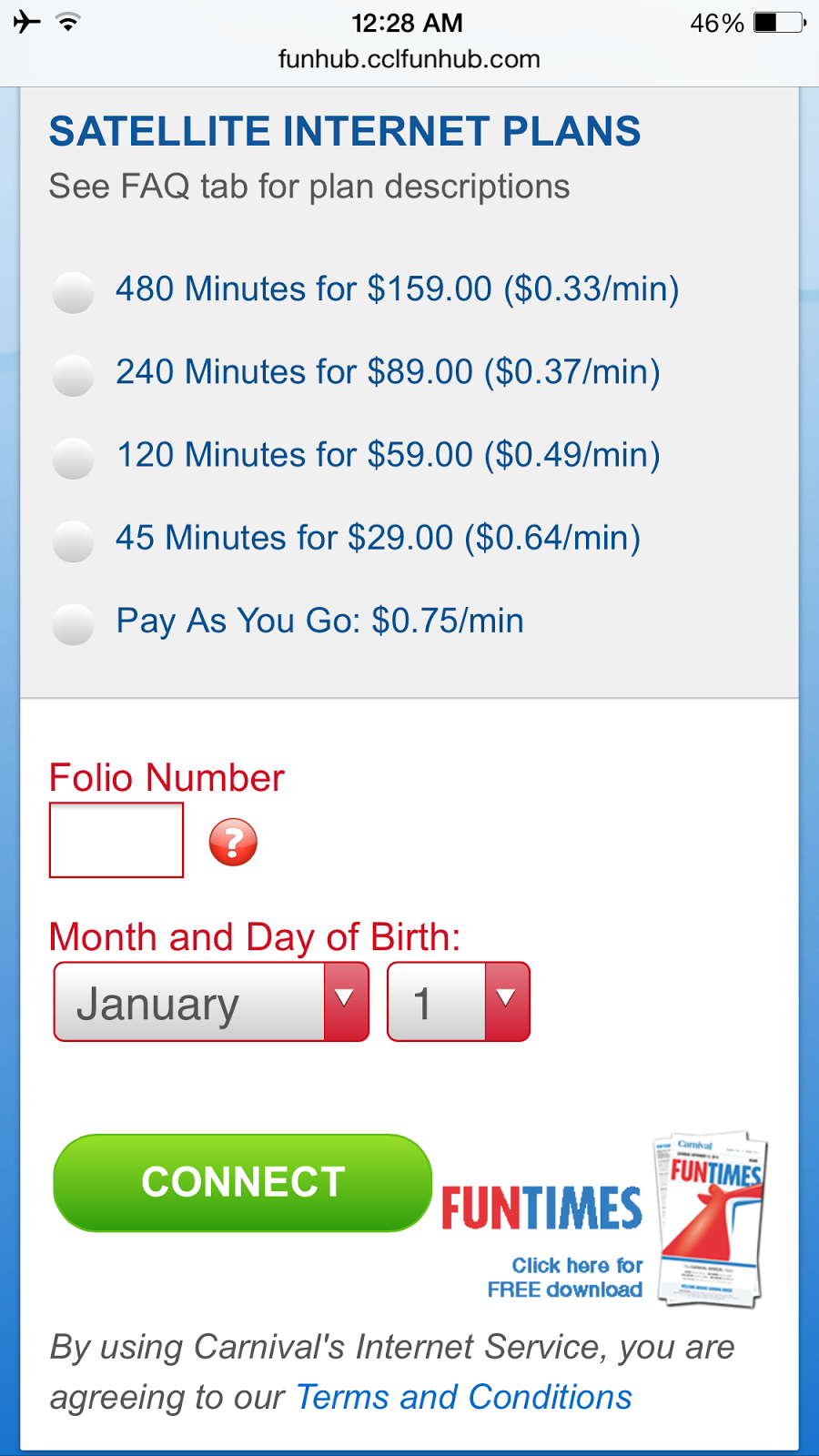
  • Internet Cleansing. I rarely unplug completely from work and social media, but when I saw the rates that Carnival was charging for satellite internet, I decided to forego connections to the rest of the world. Going a full week without internet access was not as hard as I thought it would be, especially with the fee schedule below.
  • Cellular Cleansing.  There are no cellular towers out at sea, so communication can be difficult without cell phones, especially with large parties (we had 14 in our group).  Walkie talkies would have come in handy aboard the cruise ship.
  • Body Cleansing. Given that I shared a room with 3 other people, there was competition for bathroom time which forced me to look for alternatives.  To my surprise, I discovered that the showers in the gym were better than the ones in our personal cabin.  The gym showers were equipped with rain shower heads and 4 additional shower heads on the side (not that I needed them), and there was much more space to dress.
  • Wallet Cleansing.  I was not too surprised to encounter sneaky hidden fees—for example, the waiters asked if we would like sparkling water or bottled water, but they did not mention the option to drink regular ice water which was free.  After being charged $5 for 1 liter of bottled water during my first meal, I learned to ask for regular ice water.
Do you have any questions for me about my Carnival cruise experience?  Let me know by posting a comment and I'll do my best to reply.