Monday, December 23, 2019

Lee Family 2019 Year In Review


Our Lee Family 2019 Year In Review is now available, with prior editions available here. Depending on the device you are using, you might be prompted by Dropbox to sign in, download the mobile app, or continue to the website—you can simply select the option to continue.

As usual, our home movies are available on Victor’s YouTube channel.

Thursday, December 12, 2019

Costco.com Price Adjustment

Recently I purchased an item from Costco.com, only to discover 2 days later that the item was offered for $15 less due to holiday promotional pricing. Fortunately, the Costco Customer Service website makes it easy to request a price adjustment. According to the terms, “Costco.com will gladly issue a credit for the difference between the price you paid and the promotional price, if your purchase was made online at Costco.com and was within 30 days prior to the change in price.”

When I submitted my request, I was asked for my Costco membership number, order number, the price I paid, the promotional price of the item, and some basic contact information. When my item shipped, I was charged the original full price. One day later, I received a refund notification from Costco.


Not once did I have to explain my situation or even make a phone call. I love consumer-friendly policies like this, and I also love it when technology works. Happy holidays everyone!

Tuesday, November 26, 2019

UberX at LAX

I travel frequently for business, and I usually take Uber to and from Los Angeles International Airport (LAX). For many years, I’ve been able to summon an UberX car for curbside pickup from any of several ride sharing zones distributed throughout the airport. However, starting October 29, 2019, UberX pickups at LAX were transitioned to a new location called LAX-it. Note that Uber Black and Uber Black SUV continue to pick up passengers curbside at the terminals.

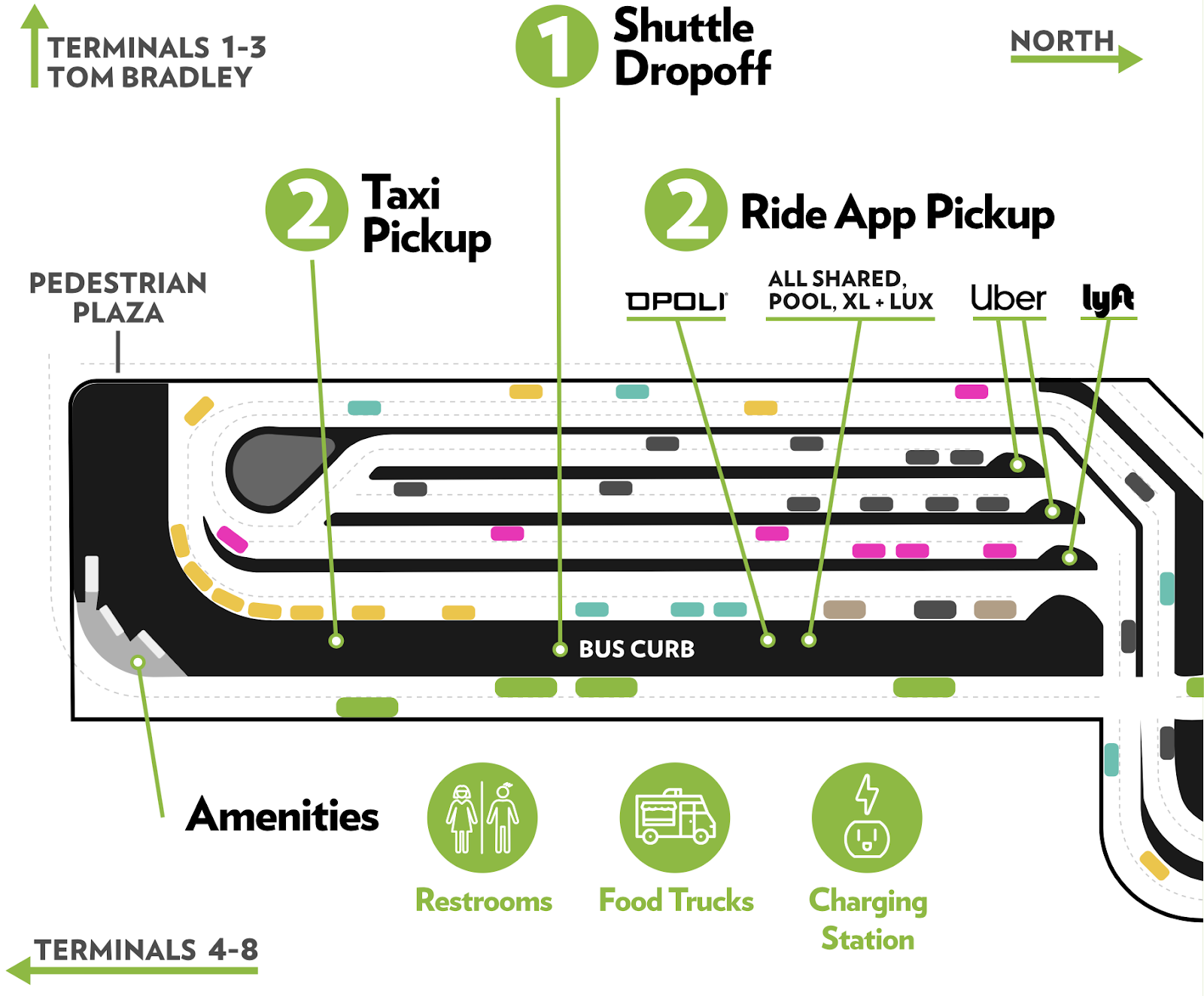
I thought I’d share my experience after summoning my first Uber ride from LAX-it. The first thing I had to do was find the shuttle that would take me from the terminal to the new Uber pickup point. Although Uber pickups were formerly on the departure (upper) level, the LAX-it shuttle is boarded from the arrivals (lower) level. Pickup points are shown in the following figure:


Depending on the terminal where you arrive, the shuttle may take up to 15 minutes to drive you to the Uber pickup point. According to the LAX-it website, it is about a 3-minute walk from Terminal 1 and an 8-minute walk from Terminals 7 and 8.

My next decision was when to summon my UberX ride. I arrived at Terminal 4 which is about a 10-mimute shuttle ride to LAX-it. Out of curiosity, I searched for available cars immediately upon boarding the shuttle, and the Uber app quoted me an UberX ride for $24. However, not knowing exactly when I’d arrive, I didn’t want to summon a car and keep the driver waiting so did not request the ride just yet. As the shuttle took me closer to LAX-it, I kept checking UberX fares, and I saw the prices increase to $30, $40, and eventually $50. I hypothesized that this was due to surge pricing as a result of a busload of passengers all requesting UberX rides at around the same time. I decided to wait until I knew exactly where I was going before officially requesting my UberX car.

After the shuttle dropped us off at LAX-it, there were plenty of signs that directed me to the UberX pickup area. Note that Uber Pool and Uber XL pickup points are in a different area. There are also separate designated areas for Lyft, taxis, and other ground transportation.


When I arrived at the UberX pickup area, I saw a short line, along with signage that provides travelers with instructions on how to request an UberX car. After you request UberX, instead of being paired with a specific UberX driver, you are provided with a 6-digit PIN. When you get to the front of the UberX line, you approach the next available UberX driver and provide your PIN. The UberX driver enters the PIN into his/her app, and that provides the driver with your destination.


My ride was priced at $45, almost double the fare that I was initially quoted. I wonder if it would have honored the initial $24 fare, despite me being more than 10 minutes away from my Uber driver. Next time I take UberX from LAX, I will try to request my PIN immediately after getting on the shuttle to see if it will let me lock in a rate while I am still en route to LAX-it. If you have any thoughts on the optimal time to request your UberX PIN, leave a comment below!

Sunday, November 17, 2019

I’m Not Working Out, I’m Just Walking

On most days, I walk my child to school and/or back home from school. On most days, my Apple Watch interrupts me to tell me this:


While I am able to mute the workout reminder for a day, does anyone know how I can mute the workout reminder permanently? According to Apple’s Work out with your Apple Watch support page, “To turn this setting on or off, open the Settings app on your Apple Watch, tap Workout, then go to Start Workout Reminder.” However, I don’t have a Workout option on my Apple Watch’s Settings app. Anyone know how to stop the madness?

Saturday, October 5, 2019

UFC: Undisputedly Fantastic Content

The UFC is not a fight company, it’s a production company—
one of the biggest in the world—that just happens to sell fights.

This is a quote from Into the Cage: The Rise of UFC Nation by Nick Gullo. As a mixed martial arts (MMA) fan who not only watches MMA fights but also follows matchmaking, fight preparation, fight promotion, weigh-ins, and post-fight press conferences, most of which is available on YouTube, this made complete sense to me. I’ve always been impressed with not just the depth of insider coverage of the UFC (which stands for “Ultimate Fighting Championship”), but also the quality of video production. A sampling of UFC programs that I regularly watch include (in no particular order):

  • UFC Countdown: summarizes the journey of the fighters leading up to UFC events
  • UFC Inside the Octagon: analysts profile fighter strengths, weaknesses, and fight strategy
  • UFC Embedded: an inside view of the lives of fighters in the days leading up to an event
  • UFC Connected: a detailed focus on UFC fighters and their lives in and out of the octagon
  • Dana White: Lookin’ for a Fight: Dana and his buddies watch local fight promotions; show production is in an adrenaline-pumping, profanity-laced travel vlog format
  • Dana White’s Contender Series: a fight card in between UFC events, with certain fighters on each episode awarded UFC contracts

There are also special video series such as UFC: 25 Years in Short. And let’s not forget The Ultimate Fighter reality TV series whose season 1 finale arguably saved the UFC from bankruptcy. Since I make home movies and have my own YouTube channel, I can appreciate the professional production quality of all UFC videos. The UFC really does invest a lot of effort in keeping its fan base engaged in its business 365 days a year, and a big part of that, at least from my experience, is through high quality video content. Recently I came across an article that provides insight into the UFC’s finances, and it provided the following chart:


Content production costs totaled a whopping 19.6% of all UFC expenses in 2015. The only larger expense category was fighter compensation (23.0%), and coming in third was employee compensation (11.3%). In other words, the UFC spends almost twice as much money producing content as it does paying its own employees. Note that there is a separate category for marketing costs (10.4%), exclusive of content production.

Elsewhere in the book, Nick Gullo summarizes a conversation with UFC President Dana White. Dana asserts that boxing promoters don’t invest in the sport because they simply coordinate and promote boxing matches, then take their money and run. Gullo writes:
On the flip side, the UFC “four walls” the event—which means they handle everything: broadcast production, ticket and merchandise sales, designing posters, you name it. The organization 24/7 promotes its fighters, pushes them in the UFC magazine and The Ultimate Fighter, features them on the UFC website, the television shows, video blogs, billboards. Drive down the highway, enter a grocery store, flip on the TV, wherever you turn it’s UFC Nation. And because they do everything and control everything, they deliver product that eclipses boxing.
I appreciate when my world view is challenged by a new perspective, and I agree that the UFC is a production company that happens to sell fights. I think this also supports Bill Gates’ assertion that content is king. While there are other MMA promotions such as Bellator, ONE Championship, Professional Fighters League, Titan Fighting Championships, Rizin Fighting Federation, and many others, the UFC is in a class of its own by any measure. I believe that its content production and its “four walls” approach has a lot to do with its success.

Even if you are not a fan of MMA, hopefully you’ll at least click on some of the links and appreciate the high quality UFC video content.

Monday, September 9, 2019

Verizon Wireless Safety Mode

Our family doesn’t usually consume a large amount of wireless data. While we often use our desktop and mobile devices to stream music and video content through our wifi connection at home, we generally use our cellular data sparingly while on the road. Therefore, we subscribe to a 2 GB data plan through Verizon Wireless.

About a year ago, I activated a complimentary Safety Mode option that allows users to continue using cellular data at reduced speeds if they run out of data before the end of their billing cycle. This past month, we vacationed in Maui and also took a road trip to Arizona, New Mexico, and Texas to visit some national park service sites. We used up our 2 GB allowance of data several days before the end of our billing cycle, so Safety Mode kicked in.

According to Verizon Wireless, data speeds in Safety Mode are reduced to 128 Kbps. I wanted to verify for myself, so I installed Speedtest for iOS and checked for myself. Here’s my result:


A download speed of 0.05 Mbps x 1024 = 51.2 Kbps, about half of the advertised speed. For comparison, I checked the speed of my Spectrum wifi connection:


As a final comparison, at the start of my new billing cycle, I checked the normal speed of my Verizon Wireless connection:


From this I can conclude that (1) at least relatively speaking, the results of Speedtest seem to be on target; and (2) my Safety Mode data speed appears to be slower than advertised. Despite this finding, I think it is fantastic that I have a way to get cellular data beyond my monthly allowance without being charged overages or being required to upgrade my plan.

Sunday, September 8, 2019

Support for Legacy iOS

I have an iPad 2 (512 MB DDR2 RAM, 16 GB flash memory) that I use primarily for reading e-books and playing music, while our newer iPad and iPhones are used for more modern and processor-intensive applications. The iPad 2 was released in March 2011 (more than 8 years ago) and was discontinued in March 2014. For many years, I had assumed that it would be forever stuck on iOS 9.3.5 which was released in August 2016. To my surprise, I discovered that Apple released iOS 9.3.6 in July 2019, nearly 3 years after iOS 9.3.5.


According to a Apple Support document, this update was released “to make sure that its GPS, date, and time continue to work properly” and applies to iOS 9 and 10. It goes on to say “This is due to the GPS time rollover issue that began affecting GPS-enabled products from other manufacturers on April 6, 2019. Affected Apple devices are not impacted until November 3, 2019.”

I’m pleased that Apple has decided to support these legacy operating systems. It’s one of the reasons why I enjoy being a part of the Apple ecosystem. The fact that I can still use an 8-year old iPad (and a 12-year old mid-2007 24-inch iMac) is testimony to the total cost of ownership and the value of these products.