I use the iOS Health app on my iPhone from time to time to review my walking + running distances. I've written in the past about distance tracking accuracy here and about a strange issue here. I also want to highlight that I find it inconvenient at times when I launch the Health app, only to find that it has yet to update walking + running distances from the past several hours. Example:
In the screenshot on the left, notice that the time is 5:27 PM and that no walking or running activity has been registered since 7:00 AM. At this time, the total distance is 0.59 miles. Tapping on "Show All Data" yields the screenshot in the middle, and it shows that the total distance for the day is actually 5 miles. Tapping on "Back" takes us back to the original Walking + Running Distance screen which now displays recorded distances from 8:00 AM to 5:27 PM, including the 5 total miles spread throughout the day.
This issue has occurred on my iPhone for the past several months, and only recently did I discover that navigating to the "Show All Data" screen forces a refresh. Maybe this is a bug that can be fixed in a future release.
Showing posts with label Activity. Show all posts
Monday, October 29, 2018
Sunday, October 28, 2018
Inconceivably Regular Activity
The Apple iOS Health app on my phone (iPhone 6 Plus, iOS 12.0.1) suits my simple needs. It tracks my walking + running distance and lets me view my activity data in increments of days, weeks, months, and even years. Since I don't use any GPS-enabled apps to accurately track my distances, I've compared known running distances against Apple Health and have found it to be fairly accurate. However, something strange happened the other day. I noticed that Health was registering just under 0.2 miles/hour for every hour of the day:
On October 24 (left image), the Health app correctly logged the distances that I logged at 7 AM and 8 AM as I walked my child to school and walked back home. Then at 4 PM, it began recording distances of just under 0.2 miles/hour for the remainder of the day. This continued for all 24 hours of October 25 (center image) and lasted until 9 AM on October 26 (right image).
Obviously I did not really perform that activity at such a regular pace for 42 straight hours. I also did not place the phone on a vibrating surface or any other surface that was in motion for that time frame. In fact, I had a pretty normal routine where I left the phone on my desk while working and picked it up only to make phone calls, use mobile apps, or when leaving home.
The total distance of 4.5 miles on October 25 is a little on the low side since I walked my child to school (round trip of 1.75 miles) and ran/walked 3.75 miles (my usual route) which adds up to 5.5 miles, so maybe the app was simply not recognizing movement correctly for that 42-hour timespan. That being said, I suppose this could be within the margin of error of distance tracking without a GPS. Thinking about possible data corruption issues, I don't recall my iPhone crashing or being dropped during that time, nor had I experienced an unexpected shutdown due to complete battery drainage.
So I'm not quite sure what happened, but in the last 48+ hours (it's now October 28), the app appears to have returned to normal activity tracking. If you've seen this sort of strangely consistent recorded activity on your iOS Health app or even know why this is happening, let me know.
On October 24 (left image), the Health app correctly logged the distances that I logged at 7 AM and 8 AM as I walked my child to school and walked back home. Then at 4 PM, it began recording distances of just under 0.2 miles/hour for the remainder of the day. This continued for all 24 hours of October 25 (center image) and lasted until 9 AM on October 26 (right image).
Obviously I did not really perform that activity at such a regular pace for 42 straight hours. I also did not place the phone on a vibrating surface or any other surface that was in motion for that time frame. In fact, I had a pretty normal routine where I left the phone on my desk while working and picked it up only to make phone calls, use mobile apps, or when leaving home.
The total distance of 4.5 miles on October 25 is a little on the low side since I walked my child to school (round trip of 1.75 miles) and ran/walked 3.75 miles (my usual route) which adds up to 5.5 miles, so maybe the app was simply not recognizing movement correctly for that 42-hour timespan. That being said, I suppose this could be within the margin of error of distance tracking without a GPS. Thinking about possible data corruption issues, I don't recall my iPhone crashing or being dropped during that time, nor had I experienced an unexpected shutdown due to complete battery drainage.
So I'm not quite sure what happened, but in the last 48+ hours (it's now October 28), the app appears to have returned to normal activity tracking. If you've seen this sort of strangely consistent recorded activity on your iOS Health app or even know why this is happening, let me know.
Friday, July 14, 2017
Walking + Running Distance on iOS Activity App
Lately I've been doing a little more running than usual, so I've taken greater interest in Apple's iOS Activity App. Since I often run the same route, I've measured the distance on Google Maps and have found the Activity app to be highly accurate in terms of estimating distances.
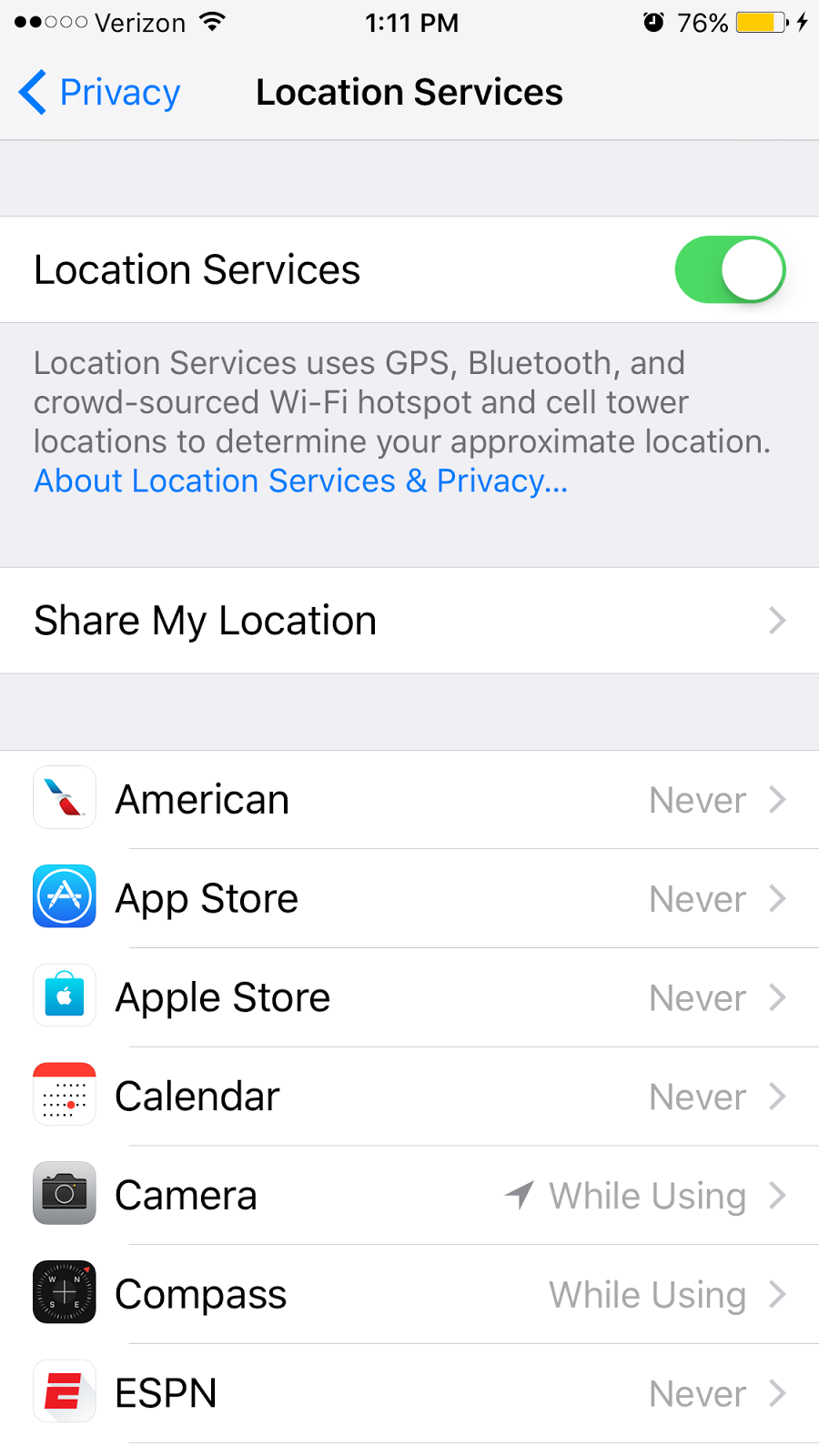
I wonder if distance is estimated using data from its built-in accelerometers and gyroscopes alone or if GPS data is also used to optimize precision. To investigate, I checked my Location Services settings. There is an option to toggle Location Services on/off globally, or one can globally enable Location Services but toggle it on/off for each individual app. I discovered that the Activity app is entirely missing from the list of apps:
So does that mean Activity does not use GPS at all? Inquiring minds want to know.
2017-07-24 UPDATE: Today I turned off Location Services, so in theory the Activity app should NOT be able to leverage GPS, Bluetooth, or Wi-Fi to approximate my location while running. I then ran my usual 3-mile route, and the Activity app seemed to be just as accurate in estimating distance (walking + running distance: 0.3 miles before my run, 3.3 miles after my run), presumably from the accelerometer and gyroscope data.
I wonder if distance is estimated using data from its built-in accelerometers and gyroscopes alone or if GPS data is also used to optimize precision. To investigate, I checked my Location Services settings. There is an option to toggle Location Services on/off globally, or one can globally enable Location Services but toggle it on/off for each individual app. I discovered that the Activity app is entirely missing from the list of apps:
So does that mean Activity does not use GPS at all? Inquiring minds want to know.
2017-07-24 UPDATE: Today I turned off Location Services, so in theory the Activity app should NOT be able to leverage GPS, Bluetooth, or Wi-Fi to approximate my location while running. I then ran my usual 3-mile route, and the Activity app seemed to be just as accurate in estimating distance (walking + running distance: 0.3 miles before my run, 3.3 miles after my run), presumably from the accelerometer and gyroscope data.
Subscribe to:
Posts (Atom)