On most days, I walk my child to school and/or back home from school. On most days, my Apple Watch interrupts me to tell me this:
While I am able to mute the workout reminder for a day, does anyone know how I can mute the workout reminder permanently? According to Apple’s Work out with your Apple Watch support page, “To turn this setting on or off, open the Settings app on your Apple Watch, tap Workout, then go to Start Workout Reminder.” However, I don’t have a Workout option on my Apple Watch’s Settings app. Anyone know how to stop the madness?
Sunday, November 17, 2019
Saturday, October 5, 2019
UFC: Undisputedly Fantastic Content
The UFC is not a fight company, it’s a production company—
one of the biggest in the world—that just happens to sell fights.
This is a quote from Into the Cage: The Rise of UFC Nation by Nick Gullo. As a mixed martial arts (MMA) fan who not only watches MMA fights but also follows matchmaking, fight preparation, fight promotion, weigh-ins, and post-fight press conferences, most of which is available on YouTube, this made complete sense to me. I’ve always been impressed with not just the depth of insider coverage of the UFC (which stands for “Ultimate Fighting Championship”), but also the quality of video production. A sampling of UFC programs that I regularly watch include (in no particular order):
- UFC Countdown: summarizes the journey of the fighters leading up to UFC events
- UFC Inside the Octagon: analysts profile fighter strengths, weaknesses, and fight strategy
- UFC Embedded: an inside view of the lives of fighters in the days leading up to an event
- UFC Connected: a detailed focus on UFC fighters and their lives in and out of the octagon
- Dana White: Lookin’ for a Fight: Dana and his buddies watch local fight promotions; show production is in an adrenaline-pumping, profanity-laced travel vlog format
- Dana White’s Contender Series: a fight card in between UFC events, with certain fighters on each episode awarded UFC contracts
There are also special video series such as UFC: 25 Years in Short. And let’s not forget The Ultimate Fighter reality TV series whose season 1 finale arguably saved the UFC from bankruptcy. Since I make home movies and have my own YouTube channel, I can appreciate the professional production quality of all UFC videos. The UFC really does invest a lot of effort in keeping its fan base engaged in its business 365 days a year, and a big part of that, at least from my experience, is through high quality video content. Recently I came across an article that provides insight into the UFC’s finances, and it provided the following chart:
Content production costs totaled a whopping 19.6% of all UFC expenses in 2015. The only larger expense category was fighter compensation (23.0%), and coming in third was employee compensation (11.3%). In other words, the UFC spends almost twice as much money producing content as it does paying its own employees. Note that there is a separate category for marketing costs (10.4%), exclusive of content production.
Elsewhere in the book, Nick Gullo summarizes a conversation with UFC President Dana White. Dana asserts that boxing promoters don’t invest in the sport because they simply coordinate and promote boxing matches, then take their money and run. Gullo writes:
On the flip side, the UFC “four walls” the event—which means they handle everything: broadcast production, ticket and merchandise sales, designing posters, you name it. The organization 24/7 promotes its fighters, pushes them in the UFC magazine and The Ultimate Fighter, features them on the UFC website, the television shows, video blogs, billboards. Drive down the highway, enter a grocery store, flip on the TV, wherever you turn it’s UFC Nation. And because they do everything and control everything, they deliver product that eclipses boxing.I appreciate when my world view is challenged by a new perspective, and I agree that the UFC is a production company that happens to sell fights. I think this also supports Bill Gates’ assertion that content is king. While there are other MMA promotions such as Bellator, ONE Championship, Professional Fighters League, Titan Fighting Championships, Rizin Fighting Federation, and many others, the UFC is in a class of its own by any measure. I believe that its content production and its “four walls” approach has a lot to do with its success.
Even if you are not a fan of MMA, hopefully you’ll at least click on some of the links and appreciate the high quality UFC video content.
Monday, September 9, 2019
Verizon Wireless Safety Mode
Our family doesn’t usually consume a large amount of wireless data. While we often use our desktop and mobile devices to stream music and video content through our wifi connection at home, we generally use our cellular data sparingly while on the road. Therefore, we subscribe to a 2 GB data plan through Verizon Wireless.
About a year ago, I activated a complimentary Safety Mode option that allows users to continue using cellular data at reduced speeds if they run out of data before the end of their billing cycle. This past month, we vacationed in Maui and also took a road trip to Arizona, New Mexico, and Texas to visit some national park service sites. We used up our 2 GB allowance of data several days before the end of our billing cycle, so Safety Mode kicked in.
According to Verizon Wireless, data speeds in Safety Mode are reduced to 128 Kbps. I wanted to verify for myself, so I installed Speedtest for iOS and checked for myself. Here’s my result:
A download speed of 0.05 Mbps x 1024 = 51.2 Kbps, about half of the advertised speed. For comparison, I checked the speed of my Spectrum wifi connection:
As a final comparison, at the start of my new billing cycle, I checked the normal speed of my Verizon Wireless connection:
From this I can conclude that (1) at least relatively speaking, the results of Speedtest seem to be on target; and (2) my Safety Mode data speed appears to be slower than advertised. Despite this finding, I think it is fantastic that I have a way to get cellular data beyond my monthly allowance without being charged overages or being required to upgrade my plan.
About a year ago, I activated a complimentary Safety Mode option that allows users to continue using cellular data at reduced speeds if they run out of data before the end of their billing cycle. This past month, we vacationed in Maui and also took a road trip to Arizona, New Mexico, and Texas to visit some national park service sites. We used up our 2 GB allowance of data several days before the end of our billing cycle, so Safety Mode kicked in.
According to Verizon Wireless, data speeds in Safety Mode are reduced to 128 Kbps. I wanted to verify for myself, so I installed Speedtest for iOS and checked for myself. Here’s my result:
A download speed of 0.05 Mbps x 1024 = 51.2 Kbps, about half of the advertised speed. For comparison, I checked the speed of my Spectrum wifi connection:
As a final comparison, at the start of my new billing cycle, I checked the normal speed of my Verizon Wireless connection:
From this I can conclude that (1) at least relatively speaking, the results of Speedtest seem to be on target; and (2) my Safety Mode data speed appears to be slower than advertised. Despite this finding, I think it is fantastic that I have a way to get cellular data beyond my monthly allowance without being charged overages or being required to upgrade my plan.
Sunday, September 8, 2019
Support for Legacy iOS
I have an iPad 2 (512 MB DDR2 RAM, 16 GB flash memory) that I use primarily for reading e-books and playing music, while our newer iPad and iPhones are used for more modern and processor-intensive applications. The iPad 2 was released in March 2011 (more than 8 years ago) and was discontinued in March 2014. For many years, I had assumed that it would be forever stuck on iOS 9.3.5 which was released in August 2016. To my surprise, I discovered that Apple released iOS 9.3.6 in July 2019, nearly 3 years after iOS 9.3.5.
According to a Apple Support document, this update was released “to make sure that its GPS, date, and time continue to work properly” and applies to iOS 9 and 10. It goes on to say “This is due to the GPS time rollover issue that began affecting GPS-enabled products from other manufacturers on April 6, 2019. Affected Apple devices are not impacted until November 3, 2019.”
I’m pleased that Apple has decided to support these legacy operating systems. It’s one of the reasons why I enjoy being a part of the Apple ecosystem. The fact that I can still use an 8-year old iPad (and a 12-year old mid-2007 24-inch iMac) is testimony to the total cost of ownership and the value of these products.
According to a Apple Support document, this update was released “to make sure that its GPS, date, and time continue to work properly” and applies to iOS 9 and 10. It goes on to say “This is due to the GPS time rollover issue that began affecting GPS-enabled products from other manufacturers on April 6, 2019. Affected Apple devices are not impacted until November 3, 2019.”
I’m pleased that Apple has decided to support these legacy operating systems. It’s one of the reasons why I enjoy being a part of the Apple ecosystem. The fact that I can still use an 8-year old iPad (and a 12-year old mid-2007 24-inch iMac) is testimony to the total cost of ownership and the value of these products.
Friday, August 30, 2019
Panoramic Photos with GoPro
I enjoy shooting landscape photos, particularly in our U.S. national parks. Sometimes when trying to photograph a wide panoramic view, I simply can’t squeeze the entire landscape into a single photo. That’s when I use a technique where I take multiple side-by-side overlapping images and stitch them together using a software application. A useful tutorial is provided by Digital Photography School.
For most casual photographers, the built-in panoramic setting in mobile phones will suffice, but since I’m a photo geek, I prefer to shoot in RAW, apply color corrections to the individual photos, stitch, rotate, crop, and make other finishing touches. I know it requires a lot more steps, but I like the results and frankly am fascinated by the computations that are involved in the stitching process.
On a recent trip to Maui, I wanted to travel lightly and decided to leave my DSLR at home and shoot only with my iPhone and GoPro. Blasphemy, I know! While hiking in the Summit District of Haleakalā National Park, my iPhone battery died so I began shooting photos and videos with my GoPro HERO7 Black. As expected, I found myself in a scenario where I decided it would be best to take multiple images and later stitch them into a panorama.
Not having previously done this with a GoPro, and recognizing that GoPro cameras have super wide angles and significant barrel distortion, I made sure to overlap each individual photo even more than I usually do with my DSLR. The individual photos are here if you want to play with them:
Panoramic stitching applications use different methods to combine images, so it is not surprising that I got different results from three photo stitching applications. It is possible that their computational methods are detailed elsewhere, but my main focus is on the end result. Here is a summary of my findings.
Adobe Lightroom Classic CC 2017
Fail. The Panorama Merge feature in Adobe Lightroom was unable to stitch together the GoPro photos.
I got the same result with the other 2 projection options. Granted, this is an older version of Lightroom, and it is possible that the latest version would produce different results. In any case, when it successfully stitches photos, I prefer to use Lightroom for panoramas because it is the focal point of my RAW processing workflow.
PhotoStitcher 1.6
Fail. The application said that there were not enough key points.
I got the same results while trying multiple projection options. Once again, this is an older version, and I have not upgraded to version 2 because I frankly don’t use this application very much.
PTGui Pro 10.0
Winner! This is the application that I used to create the panoramic photo that is pictured at the top of this blog. Here is a screenshot of the unedited preview:
Obviously I haven’t been upgrading my software because version 11 is available at the time of this writing, and I assume that the current version would also successfully stitch the GoPro images.
Conclusion: From this comparison and also from prior experiences, I feel that PTGui is the most powerful stitching tool that I’ve tried. If your only available option is a wide angle lens, and if other applications are unable to create panoramas, try PTGui. However, the old adage that “an ounce of prevention is worth a pound of cure” definitely applies here—try to shoot panoramas with a lens that has less barrel distortion to begin with. I hope you’ve found this to be helpful.
Sunday, August 25, 2019
Mapping the U.S. National Parks
About a decade ago, I thought it would be a fun goal to try to visit all of the national parks in the United States. They are managed by the National Park Service, and currently there are 61 of them. If you also count national monuments, national historic sites, national seashores, and other national park system designations, there are currently a total of 419 units.
Over the years, I've maintained a spreadsheet of the national parks that I've visited. Not only have I periodically documented which one's I've visited, I've also had to make a few recent additions such as Pinnacles NP (established in 2013), Gateway Arch NP (2018), and Indiana Dunes NP (2019). However, a friend suggested that I create a map to visualize my progress, so I created one using Google My Maps:
I plan to update this map over time, but as of today I've visited 31 of 61 U.S. national parks. Not surprisingly, I've been more likely to visit national parks that are closer to home (Los Angeles). In fact, I've visited all of the national parks in California (9), Utah (5), Arizona (3), New Mexico (1), and Oregon (1) which are within striking distance of a 1-week road trip. Since Hawaii is one of our popular vacation destinations, it also made sense to visit its 2 national parks. Because travel logistics to Florida permitted, I've also checked off its 3 national parks.
Visiting the remainder of the U.S. national parks will require some careful planning (and time and money). I'm not only referring to the ones in the continental U.S. Namely, there are some national parks in Alaska that do not have navigable roads (Katmai NP, Lake Clark NP, Kobuk Valley NP, and Gates of the Arctic NP) so will require either chartered flights and/or backpacking trips. Also potentially challenging are American Samoa NP and Virgin Islands NP because of their distance from home, but commercial flights and lodging are available.
It is fitting that I wrote this blog on the 103rd anniversary of the National Park Service which was formed when the Organic Act was signed into law on August 25, 1916.
Over the years, I've maintained a spreadsheet of the national parks that I've visited. Not only have I periodically documented which one's I've visited, I've also had to make a few recent additions such as Pinnacles NP (established in 2013), Gateway Arch NP (2018), and Indiana Dunes NP (2019). However, a friend suggested that I create a map to visualize my progress, so I created one using Google My Maps:
I plan to update this map over time, but as of today I've visited 31 of 61 U.S. national parks. Not surprisingly, I've been more likely to visit national parks that are closer to home (Los Angeles). In fact, I've visited all of the national parks in California (9), Utah (5), Arizona (3), New Mexico (1), and Oregon (1) which are within striking distance of a 1-week road trip. Since Hawaii is one of our popular vacation destinations, it also made sense to visit its 2 national parks. Because travel logistics to Florida permitted, I've also checked off its 3 national parks.
Visiting the remainder of the U.S. national parks will require some careful planning (and time and money). I'm not only referring to the ones in the continental U.S. Namely, there are some national parks in Alaska that do not have navigable roads (Katmai NP, Lake Clark NP, Kobuk Valley NP, and Gates of the Arctic NP) so will require either chartered flights and/or backpacking trips. Also potentially challenging are American Samoa NP and Virgin Islands NP because of their distance from home, but commercial flights and lodging are available.
It is fitting that I wrote this blog on the 103rd anniversary of the National Park Service which was formed when the Organic Act was signed into law on August 25, 1916.
Thursday, July 4, 2019
Windows 10 Update Fail and Reinstalling Office 365
For work, I run Windows 10 in a Parallels Desktop virtual machine. Today my Windows Update informed me that a cumulative update for Windows 10 from version 1809 (a.k.a. October 2018) to version 1903 (a.k.a. May 2019). Given that I've been experiencing performance issues, I was hoping that this update would fix those problems and gladly chose to install it. Everything appeared to go smoothly, and I was prompted to restart my machine. However, after a successful restart, I was notified that the update failed to install.
I'm not sure if it's related, but I found a Forbes article about how Microsoft has blocked Windows 10 updates for some Mac users, as well as a Windows Support article addressing the same issue. Neither of them specifically apply to Windows 10 updates on Parallels Desktop, but I wonder if the same underlying issue applies. In any case, I decided to wait for Microsoft to address its underlying issues and wait for the next update.
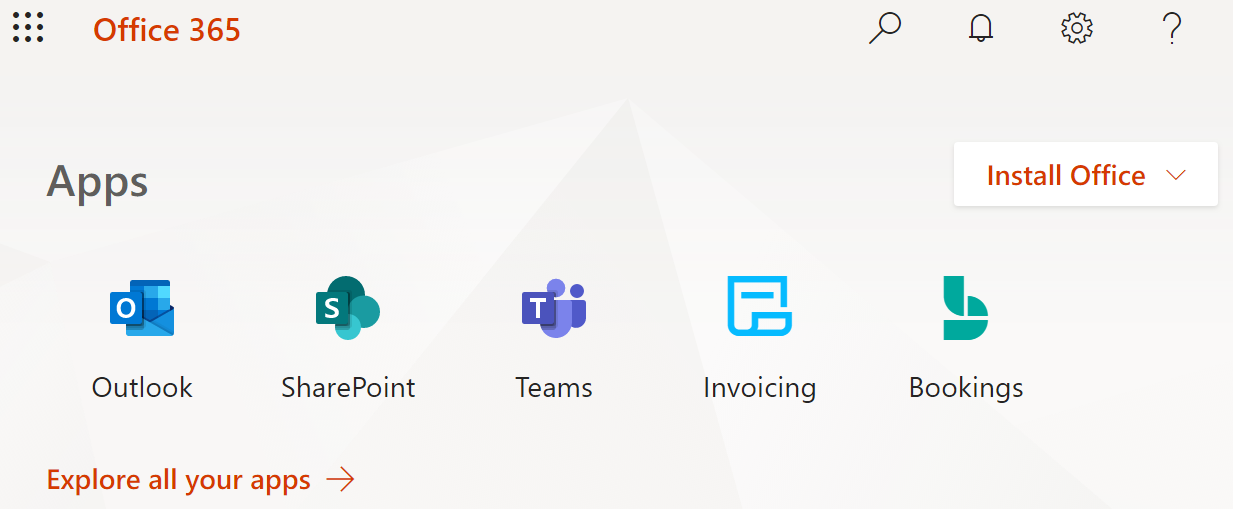
Shortly thereafter, I noticed that all of my Office 365 Business applications were missing: Outlook, Word, Excel, PowerPoint, etc. I assume that there were updates to those applications as part of version 1903, but since the update failed, I was left without any of those apps. Fortunately, I was able to easily re-install those apps without requiring any CD/DVD installer or password/serial number combinations. If you have an Office 365 Business account, use the following steps:
- Login to Office at https://www.office.com/
- Click the "Install Office" button
From there, simply follow the instructions and in a few short minutes you should be back in business, both figuratively and literally. Hope this helps!
Subscribe to:
Posts (Atom)