Sunday, January 10, 2021

AirPods Pro Ear Tip Fit Test

I just learned that my left ear canal is larger than my right ear canal. You see, I recently got my hands on a set of AirPods Pro and have been using them for a few weeks. One of the features of AirPods Pro is noise cancellation, and to optimize that, it is helpful to make sure the ear tips fit snugly in your ear canals.

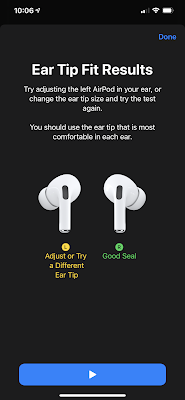
Apple provides small, medium, and large ear tips, with the medium size installed by default and the other sizes packaged separately in the box. While the AirPods Pro have been working fine for weeks, it wasn’t until today that I ran the Ear Tip Fit Test by going to Settings > Bluetooth and tapping the info button next to my AirPods Pro. With the medium ear tips on both sides, the Ear Tip Fit Test consistently told me that the left side did not fit well (image on left). I experimented with the small and large ear tips, and I found that with the large ear tips on the left side, I was able to get a good seal (image on right).
 

Although trivial on the grand scheme of things, Apple taught me something about my body today. Hmmm, interesting!

On a separate note, I noticed that I consistently begin to experience mild soreness in my ear canal after wearing the AirPods Pro for 30-60 minutes. It’s not severe enough that I need to stop using them, but I do notice that they are pressing on my ear canals. On the other hand, I can wear AirPods and EarPods for several hours a day without any discomfort. I’m not sure if I will eventually get used to the AirPods Pro and no longer have discomfort, but right now I feel that they may have a limited role in my headphone usage.

Sunday, January 3, 2021

TurboTax Mac System Requirements

In February 2020, I installed TurboTax 2019 on my dad’s 2011 iMac running macOS High Sierra 10.13 and was greeted by the following message:

According to the TurboTax Help page, here are the minimum system requirements for TurboTax on Macintosh machines:

In December 2020, I attempted to upgrade my dad’s 2011 iMac to macOS Mojave 10.14, only to discover that 10.14 does not run on his machine. Long story short, we ended up getting him a new 2020 iMac, configuring settings, re-installing software (including TurboTax 2020), and migrating all his files to his new iMac. This took almost all day and cost a lot of money, just so he could avoid paying someone to do his taxes for him.

Today I installed TurboTax 2020 on my 2012 iMac running macOS Mojave 10.14 and was greeted by the following message:

While I’m not a developer, I don’t believe that this system requirement has anything to do with Apple’s decision to have Catalina 10.15 support only 64-bit software. After all, TurboTax 2020 is already 64-bit compatible and runs on Mojave. Other possibilities for the system requirements are that it could be a technical issue with some functions that are required by TurboTax, or they could have just decided not to support older operating systems.

In any case, H&R Block’s TaxCut 2020 Premium runs on maxOS 10.13 while Intuit’s TurboTax 2020 Premier requires 10.14 so at least we know that macOS 10.13 users do have a choice when it comes to tax preparation software for calendar year 2020. For calendar year 2021, I may need to upgrade the operating system on my 2012 iMac to Catalina 10.15 which is the last supported operating system for that machine. More to come…

Monday, December 21, 2020

Lee Family 2020 Year In Review

Our Lee Family 2020 Year In Review is now available, with prior editions available here. Depending on the device you are using, you might be prompted by Dropbox to sign in, download the mobile app, or continue to the website—you can simply select the option to continue or dismiss the dialog box.

As usual, our home movies are available on Victor’s YouTube channel.

Sunday, December 20, 2020

iPhonetography: 4x3 vs. 16x9 Aspect Ratios

My old iPhone 6 Plus running iOS 12.5 has a camera sensor that takes pictures in a 4x3 aspect ratio (3,264 x 2,448 pixels, which is approximately 8 megapixels). My new iPhone 12 Pro Max running iOS 14.3 provides an option to take pictures in either a 4x3 or 16x9 aspect ratio, as shown in the following settings:


I decided to take photos in both aspect ratios and inspect the Exif data. I found that the 4x3 aspect ratio yielded a 4,032 x 3,024 image file which is approximately 12 megapixels. The 16x9 aspect ratio yielded a 4,032 x 2,268 image file which is approximately 9 megapixels. So this tells me that the iPhone 12 Pro Max sensor is still natively in 4x3 aspect ratio like its predecessors, and when shooting in 16x9 mode, the phone is cropping pixels off of the top and bottom of the image.

Image Credit: de With, Sebastiaan. The iPhone 12 Pro Max: Real Pro Photography. PetaPixel.

If you’re like me and prefer to retain as much of the original information as possible so that you can edit your photos later, I’d recommend shooting in 4x3 mode, as this option preserves the most information. If you later want to crop your photos to 16x9 or another aspect ratio, you can decide exactly how much to crop and where. On the other hand, if you have no intention of editing your photos later, I think it great that you now have the option to toggle between 4x3 and 16x9 aspect ratios depending on the effect you are trying to generate. Remember that you can go to Settings > Camera > Preserve Settings > Creative Controls to tell your camera whether or not you want it to remember the last aspect ratio you used. If you do not preserve creative controls, your camera will default to 4x3 aspect ratio upon each launch.


Advanced tip: Note that there is a caveat to what I mentioned about about shooting in 4x3 aspect ratio to preserve the most information. Without going into detail, suffice it to say that even if you shoot in 16x9 aspect ratio, your iPhone saves the entire 4x3 version of the file along with a .aae sidecar which is an XML file that contains data about the adjustments you’ve made to the photo. The cropping to 16x9 is one such adjustment. So if you want to retrieve the original 4x3 photo, you can simply import your photo into your Photos app on your Mac. You can also export the unmodified original (whether it be .heic or .jpg) from Photos so that you can perform editing in Photoshop or another app. But if you’re going to do all this, then I’d suggest simply shooting in 4x3 aspect ratio to begin with.

According to this article, the 16x9 aspect ratio option was introduced in iOS 13 and is available for iPhone 11 and higher. Happy shooting!

Friday, December 18, 2020

The Return of the Mac Startup Chime

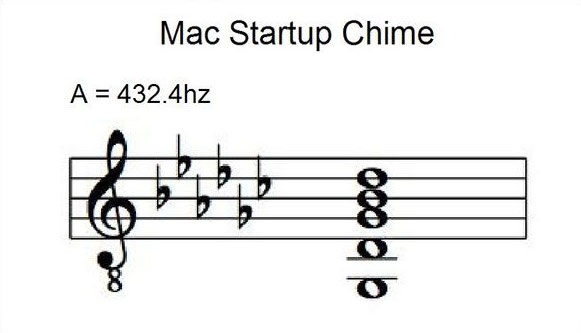
I recently installed Security Update 2020-001 Catalina on my MacBook Pro, and I noticed that it re-enabled the startup chime that had been a familiar startup sound of Macintosh computers for a long time. According to the Mac Startup Tones Apple Support page, “Mac models from early 2016 and earlier make a chime sound when they start up. Mac models from late 2016 and newer don't have a startup chime, with the exception of MacBook Air (13-inch, 2017).” Unexpectedly, the installation of the latest Catalina security update made my Mac sing a tune on startup for the first time ever.

Some people like the startup chime, as it indicates that the machine does not have a major issue with RAM or EFI ROM (extensible firmware interface ROM, a.k.a. “boot ROM”). Others prefer their machines to be silent and have even written or downloaded apps like Silent Start to silence the startup chime.

There are other ways to enable and disable the startup chime on your Mac. Onyx is a free app with a setting that allows you to toggle the chime on or off. If you don’t want to install an app and are comfortable with the macOS Terminal, simply enter the following commands as reported in this article:

Turn chime on: sudo nvram StartupMute=%00

Turn chime off: sudo nvram StartupMute=%01

\I actually like the nostalgia of the startup chime, so for the time being I’m going to leave it on.

Thursday, December 17, 2020

Information Laundering


A new phrase that I learned toady is information laundering which according to the Wikipedia page is the surfacing of news, false or otherwise, from unverified sources into the mainstream. According to the wiki, information laundering “can occur when relatively reputable news organizations report on something that a blog or platform of unknown credibility has written. These news organizations may attribute the assertion, but another publication may omit its original source… The original assertion, whether or not its source was credible, gains credibility, especially if it is used by outlets known for high standards.”

I read about information laundering in the context of this article about vaccine misinformation which is obviously a salient topic nowadays given that the first COVID-19 vaccine has been approved for emergency use in the United States, with more approvals on the way. When information laundering leads to misinformation in situations like this, it can adversely impact public health.

I am not an expert on the subject of media manipulation, but I believe that we should all critically appraise the information that we receive from any source. There are many fact checking websites summarized here and here. We’re all at risk of being exposed to laundered information through an endless number of media sources, so recognizing that possibility is the first step to ensuring that we’re getting our facts straight.

Technology or Clairvoyance?

I received the following email message today from my bank:

It says, “Looks like the mobile phone number we have on file for you may be incorrect. This could be the result of changing your phone number and/or mobile carrier.” As I’ve recently discussed, I changed my mobile phone carrier (and kept the same phone number). I wonder how my bank knew that I changed my phone number and/or mobile carrier? My new mobile carrier would not have notified my bank, as they have no knowledge of my banking information—I only provided a credit card as a form of payment. If you know of the technology that was used to detect the change in my mobile carrier, please leave a comment. Inquiring minds want to know!

🤔